AWS Custom RDS is a feature of AWS RDS designed to provide more flexibility for running database workloads that require specific configurations not supported by the standard managed RDS offerings. It is especially useful for applications that need custom database software, extensions, or configurations that go beyond the capabilities of the default RDS configurations. One of the main advantages is that it is giving you administrative access to both the database and the underlying operating system.
In order to use RDS Custom and to create a database, CEV(Custom Engine Version) is required. CEV is a feature of RDS Custom, designed to allow customers to create and manage custom database engine versions.
I will create now a CEV for RDS Custom for Oracle. Here is what has to be done.
Disclaimer: Some steps or configurations described in this post may incur charges when using AWS services. It is your responsibility to review AWS pricing and monitor your usage. After testing, ensure that all resources are properly deleted to avoid unexpected charges. Always use the AWS Free Tier where applicable and test responsibly.
1. Download Oracle installation media (eDelivery, Oracle Support) V982063-01(V982063-01.zip) : Oracle Database 19.3.0.0.0 for Linux x86-64, 2.8 GB Patch 36912597(p36912597_190000_Linux-x86-64.zip): DATABASE RELEASE UPDATE 19.25.0.0.0 Patch 6880880(p6880880_190000_Linux-x86-64.zip) : OPatch 12.2.0.1.44 for DB 19.0.0.0.0
Additional patches could be included if needed.
2. Create S3 bucket to store the installation media. I used a bucket without public access, in the same region where DB will be. My bucket’s name is ora2aws.
3. Upload files to the S3 bucket. It should looks like 4. KMS Key A customer managed symmetric encryption KMS key is required for RDS Custom. Either create a new customer managed symmetric encryption KMS key or use existing one. Creating key is simple and can be done from KMS service from AWS Console. !!! Do not forget to add the following actions to the key policy – kms:Decrypt*, kms:GenerateDataKey* !!! They are not there and without them creating RDS Custom DB will fail
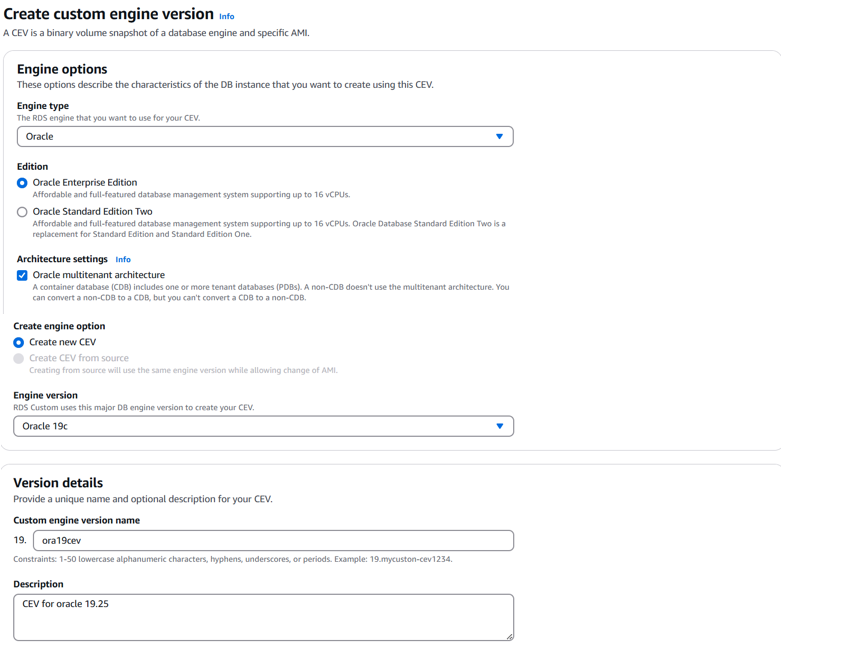
5. Go to RDS in AWS Console and from the right pane select Custom engine versions -> Create custom engine versions. I will use the following data – Engine type – Oracle Edition – Oracle Enterprise Edition Architecture settings – Oracle multitenant architecture Create new CEV is preselect Engine version – Oracle 19 Custom engine version name – ora19cev Description – provide some meaningful description AMI ID will be left empty S3 location of manifest files – browse S3 and select your bucket with the installation files. In this case s3://ora2aws
CEV manifest – you can either upload your manifest(JSON file) to some S3 bucket or paste it directly here. I will paste it here – { “mediaImportTemplateVersion”: “2020-08-14”, “databaseInstallationFileNames”: [ “V982063-01.zip” ], “opatchFileNames”: [ “p6880880_190000_Linux-x86-64.zip” ], “psuRuPatchFileNames”: [ “p36912597_190000_Linux-x86-64.zip” ] }
KMS Key – provide customer managed symmetric encryption KMS key
Some Tags could be added – it is up to you. Finally, click on ‘Create custom engine version’ button.
If you get ‘The service-linked role is in the process of being created. Try again later.’ – just wait few minutes and try again.
CEV creation took ~2 hours and 20 min. It creates 2 EC2 snapshots (Seed Database Snapshot and Binvol Snapshot), each 25G, they can be seen under EC2->Elastic Block Store->Snapshots