AWS offers different preconfigured OS images (Amazon Machine Images or AMI) to be used by launching EC2 instance – Amazon Linux, Ubuntu, RedHat, SUSE, but still not Oracle Linux(OL). Disclaimer: By EC2 instance launch (EC2 Console) search in the AMI catalog for 131827586825 – there are Oracle-provided Oracle Linux AMIs 1. SSM Agent must be installed on the machine – make ssh session and install the rpm package – Ensure that the service is up by systemctl status amazon-ssm-agent. 2. Create Endpoints needed for the SSM Create two additional endpoints for ssmmessages and ec2messages(here filter for ec2 by searching for service) 3. EC2 instance needs appropriate IAM role. There is a plenty of information in AWS Doc/Forums about that. I used the role AWSRDSCustomInstanceRole-eu-central-1 which was created before for Oracle RDS Custom (custom-oracle-iam.json). With these steps Session Manager is ready and connection to the instance is working Happy clouding!
This doesn’t mean that it is not possible to have own EC2 instance running OL – here’s how this can be done.
Some steps or configurations described in this post may incur charges when using AWS services. It is your responsibility to review AWS pricing and monitor your usage. After testing, ensure that all resources are properly deleted to avoid unexpected charges. Always use the AWS Free Tier where applicable and test responsibly.
Refer to the policy document Licensing Oracle Software in the Cloud Computing Environment for licensing and support pricing details
Just select one (f.i. for Architecture: x86_64) and then continue with the EC2 Console (Key pair, Network Settings, Storage, etc.). Free tier is eligible.
In a short time the instance is ready and can be used.
To connect by SSH Client, the instance must have public IP, then just use your .pem file to connect – using ec2_user instead of root –
ssh -i “myKey.pem” ec2-user@3.125.8.112 (IP of course will be different).
If you want to use Session Manager to connect to the instance, some additional steps must be followed.
yum install -y https://s3.amazonaws.com/ec2-downloads-windows/SSMAgent/latest/linux_amd64/amazon-ssm-agent.rpm
Go to VPC Console->Endpoints and create endpoint. Select Type ‘AWS service’

Under Services filter for ssm and select com.amazonaws.eu-central-1.ssm (if you are not in eu-central-1 the name will be different, showing the region)
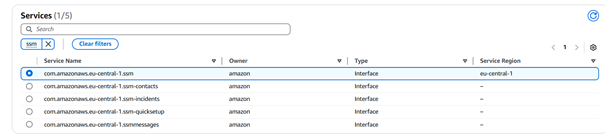
Make sure you select the VPC where the EC2 instance is running and correct subnet as well security group and then create the endpoint.


Oracle Linux on EC2
AWS offers different preconfigured OS images (Amazon Machine Images or AMI) to be used by launching EC2 instance – Amazon Linux, Ubuntu, RedHat, SUSE, but still not Oracle Linux(OL).
This doesn’t mean that it is not possible to have own EC2 instance running OL – here’s how this can be done.