Disclaimer:
Some steps or configurations described in this post may incur charges when using AWS services. It is your responsibility to review AWS pricing and monitor your usage. After testing, ensure that all resources are properly deleted to avoid unexpected charges. Always use the AWS Free Tier where applicable and test responsibly.
1. Launch an EC2 Instance
This is pretty simple, under EC2 section in AWS Console name your EC2 instance, select Amazon Linux(or what distribution you prefer), instance type (I am going to use t2.medium – not free tier, but need more memory – docker image comes wit SGA 1536M), Key pair, storage 50G gp3 (for non-prod general purpose ssd is fine). Do not forget to select appropriate security group and to allow ssh from anywhere and public IP auto-assign – yes, I know, this is not good idea, but hey, I am not building production environment, just exercising aws 😉
2. Install Docker & Dependencies
There are different ways to connect to your EC2 instance, I just will use EC2 Instance Connect here – connect and run
sudo yum install -y docker
sudo systemctl enable docker
sudo systemctl start docker
sudo usermod -aG docker ec2-user
3. Get the Oracle Docker Image
Log out and log in for group changes to take effect.
Run the following command to get Oracle Database XE Release 21c (21.3.0.0) Docker Image –
docker pull container-registry.oracle.com/database/express:latest
latest: Pulling from database/express
2318ff572021: Pull complete
c6250726c822: Pull complete
33ac5ea7f7dd: Pull complete
753e0fae7e64: Pull complete
Digest: sha256:dcf137aab02d5644aaf9299aae736e4429f9bfdf860676ff398a1458ab8d23f2
Status: Downloaded newer image for container-registry.oracle.com/database/express:latest
container-registry.oracle.com/database/express:latest
Verify it –
docker images
REPOSITORY TAG IMAGE ID CREATED SIZE
container-registry.oracle.com/database/express latest 8da8cedb7fbf 19 months ago 11.4GB
4. Run the Oracle Container
docker run –name orax213 \
-p 1521:1521 -p 5500:5500 \
-e ORACLE_PWD=welcome1 \
-e ORACLE_CHARACTERSET=AL32UTF8 \
-v /home/ec2-user/oradata \
-d container-registry.oracle.com/database/express
5. Verify Oracle is Running
docker ps
CONTAINER ID IMAGE COMMAND CREATED STATUS PORTS NAMES
8cbe510f2dd8 container-registry.oracle.com/database/express “/bin/bash -c $ORACL…” About a minute ago Up About a minute (healthy) 0.0.0.0:1521->1521/tcp, :::1521->1521/tcp, 0.0.0.0:5500->5500/tcp, :::5500->5500/tcp orax213
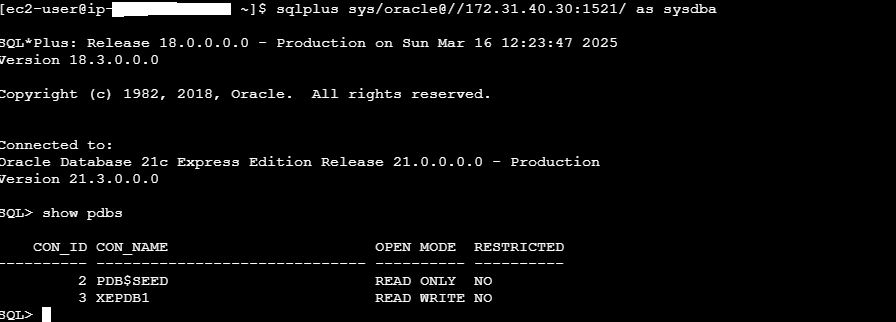
Connect to the database (XEPDB1 is the service name for the first PDB created by default) –
docker exec -it orax213 sqlplus sys/welcome1@//localhost:1521/XEPDB1 as sysdba
SQL*Plus: Release 21.0.0.0.0 – Production on Tue Mar 11 09:41:01 2025
Version 21.3.0.0.0
Copyright (c) 1982, 2021, Oracle. All rights reserved.Connected to:
Oracle Database 21c Express Edition Release 21.0.0.0.0 – Production
Version 21.3.0.0.0
SQL> show pdbs
CON_ID CON_NAME OPEN MODE RESTRICTED
———- —————————— ———- ———-
3 XEPDB1 READ WRITE NO
If you check for the smon db process –
ps -ef | grep smon
54321 28698 28585 0 09:38 ? 00:00:00 xe_smon_XE
you will notice that the owner of the process is 54321 – this is because Oracle inside the container runs as user ID 54321.
At the end stop and remove the container
docker stop 8cbe510f2dd8
docker rm 8cbe510f2dd8
and terminate the EC2 instance.
Happy clouding!